I’ve been living and working on the road for years, building my travel blog from cafés in Lisbon, coworking spaces in Thailand, and mountain cabins in Vermont. After traveling through 70+ countries, one thing has become clear: the laptop you travel with can make or break your workflow. I’ve had machines overheat mid-flight, die halfway through a project in Bali, and weigh me down while sprinting through European train stations. I’ve also had laptops that felt like superpowers in my backpack, letting me create, edit, and publish seamlessly no matter where I was.
When I sat down to rate the best travel laptops for 2026, I looked at what matters to digital nomads like me. Weight, portability, battery life, durability, screen quality, and price all made my list. And because I’m a content creator, I cared just as much about how these handle creative work: photo editing, video production, and multitasking with dozens of tabs open.
These six laptops stood out above the rest. They’re the machines I fully trust on the road: powerful enough to keep up, light enough to carry, and tough enough to handle the chaos of travel.
- Read also: My Favorite Travel Jobs
The Best Travel Laptops for Remote Work at a Glance
The best laptop for remote work depends entirely on what you do on the road. A writer needs something different from a video editor, and someone watching every dollar needs something different again. Here’s the short version before I get into the details.
2.7 pounds, 18 hours of battery, and enough power for most workflows. The one I’d hand to almost anyone. From $1,299.
Redesigned for 2026 at 2.2 pounds with a 2.5K 120Hz display. Nothing else in Windows comes close at $699.
M5 Pro and Max chips handle 4K editing and rendering anywhere. Heavy at 4.8 pounds, and pricey from $2,999.
A 120Hz OLED screen and 22 hours of tested battery life. The best Windows laptop HP has made. From $1,899.
Ran 19 hours in testing, beating the MacBook Air by four. Great OLED, and the config to buy is $1,499.
The lightest pick here at 1.5 pounds, and a real tablet too. Just budget $150 extra for the keyboard.

1. MacBook Air M5 – Best Lightweight Laptop for Travelers
The MacBook Air M5 is honestly the best travel laptop you can get right now, and I’m not just saying that because of the hype. Apple refreshed it in March 2026, and while the price has climbed, so has what you get in the box. I’ve been using the Air for months, and the performance is incredible for something this light.
It weighs just 2.7 pounds and measures only 0.44 inches thick, but don’t let that fool you. This thing can handle serious work. The M5 chip with its 10-core CPU and up to 10-core GPU makes video editing and coding feel effortless, even when you’re running multiple apps.
Battery life hits up to 18 hours for video playback. I’ve tested this on long flights, and it’s legit – no more hunting for outlets at airports. The MagSafe charging and two Thunderbolt ports give you all the connectivity you need, and this year’s model adds Wi-Fi 7 and Bluetooth 6 for faster, more stable connections in sketchy café networks.
The bigger upgrade is storage. Base models now ship with 512GB instead of 256GB, and the SSD is twice as fast as last year’s. That’s a real quality-of-life win if you’re moving big photo or video files around.
The Air now starts at $1,299 for the 13-inch and $1,499 for the 15-inch, up from $999 and $1,199 last year. Apple raised prices across the lineup in mid-2026 because of the global memory shortage, and it stings. But you’re still getting a laptop that’ll last years and holds its resale value better than almost anything else out there.
✈️ My #1 Tip for Cheap 2026 Flights:
It’s fall, which is the cheapest time to book flights. I’m currently seeing roundtrips to Europe for under $350 (deals you won’t find on Google Flights).
Step 1: Join Going.com's Free Plan here . It takes 10 seconds and requires no credit card.
Step 2: If you're doing a big trip this year, grab the 14-day free trial of Premium. You can even use my code JON25 for 25% off.
Seriously, this is the single best money-saving tool I’ve used in 10+ years.
👉 Send me cheap 2026 flights- Read next: Popular Digital Nomad Destinations

2. Dell XPS 13 – Best Value
I wrote off the XPS 13 for years, so it’s annoying to admit Dell has made the most interesting laptop of 2026. They rebuilt it from scratch and dropped the price to $699, or $599 if you’re a student. That’s a long way down from the $1,399 machine it used to be, and it changes what this thing is for entirely.
At 2.2 pounds it’s the lightest XPS Dell has ever made, and lighter than my MacBook Air. Picking it up the first time surprised me. The machined aluminum body doesn’t feel remotely like a budget laptop, which was obviously the whole point.
The display is what sold me. It’s a 13.4-inch 2.5K touchscreen with a 120Hz refresh rate and full DCI-P3 color coverage, which means proper professional color accuracy on a $699 laptop. That shouldn’t exist at this price. Wi-Fi 7 comes standard too, and it holds a signal in crowded cafés better than most machines I’ve used.
Battery runs up to 17 hours streaming, and it ships with Intel’s new Core Series 3 chips, with a faster Core Ultra 7 option if you want it. The one catch is the base config: 8GB of RAM and a 512GB SSD. If all you do is write and browse, fine, but if you edit photos or run twenty tabs like I do, spend the extra on 16GB. It’s still the best value in Windows right now.

3. MacBook Pro 16-inch M5 – Best for Creatives
If you’re editing video or rendering on the road, this is still the machine to beat. Apple updated the 14- and 16-inch Pros with M5 Pro and M5 Max chips in March 2026, and the 16-inch M5 Pro now starts at $2,999. That’s a steep jump from the $2,499 of the previous generation, and there’s no getting around it.
The M5 Pro gives you an 18-core CPU and up to a 20-core GPU, while the M5 Max pushes to a 40-core GPU with up to 128GB of unified memory. Those are big leaps over the M4’s 14 and 16-core designs. For most people it’s overkill, but if you’re cutting 4K footage in a hotel room, this is the difference between waiting and working.
Battery life is the surprising part: up to 24 hours of video playback, which is the best of any MacBook ever made. Real-world creative work lands closer to 12 to 15 hours, which still covers a transatlantic flight with room to spare. Thunderbolt 5 ports handle external displays and fast transfers without complaint.
At 4.8 pounds it’s noticeably heavier than everything else here, and you feel it in a backpack by the end of a travel day. The Liquid Retina XDR display is worth the weight if color accuracy is part of your job. If it isn’t, buy the Air and spend the difference on flights.

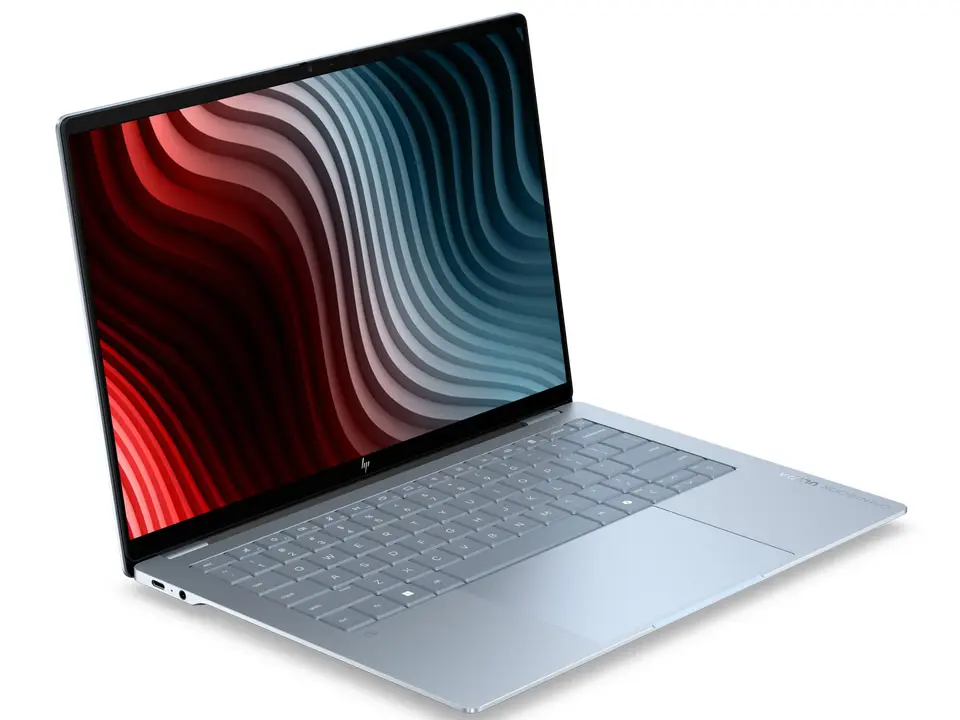
4. HP OmniBook Ultra 14 – Best Premium Windows Laptop
This is the Windows laptop I’d point people to if Apple isn’t an option. Windows Central called it the best Snapdragon X2 Elite machine they’ve tested, and their reviewer ended an eight-hour workday with 35 to 40% battery left. In controlled testing it hit 22 hours, which changes how you pack for a long flight.
The 14-inch OLED touchscreen is the standout feature. It runs at 120Hz with 3K resolution, 500 nits of brightness, and full DCI-P3 color coverage, so photo editing on the road holds up. Unlike most premium laptops, the display corners aren’t rounded, so you keep every pixel.
Performance comes from a Snapdragon X2 Elite with 18 cores, and it handles 4K video editing without stumbling. It stays quiet under load, and the SSD is among the fastest in any Windows laptop right now. At 2.81 pounds it’s heavier than the MacBook Air, but still easy to carry through an airport.
Pricing starts at $1,899 with a Snapdragon X Plus and 16GB of RAM, rising to $2,399 for the X2 Elite with 32GB. There’s no USB-A port, no SD card reader, and no 5G option at any price. The glossy screen also throws reflections in bright cafés, which matters if you work outdoors.
One thing to know: this runs Windows on ARM, so a few niche apps still need emulation. Everything most remote workers rely on runs natively. If your work depends on specialist software, check compatibility first.
5. Lenovo Yoga Slim 7x – Best Battery Life
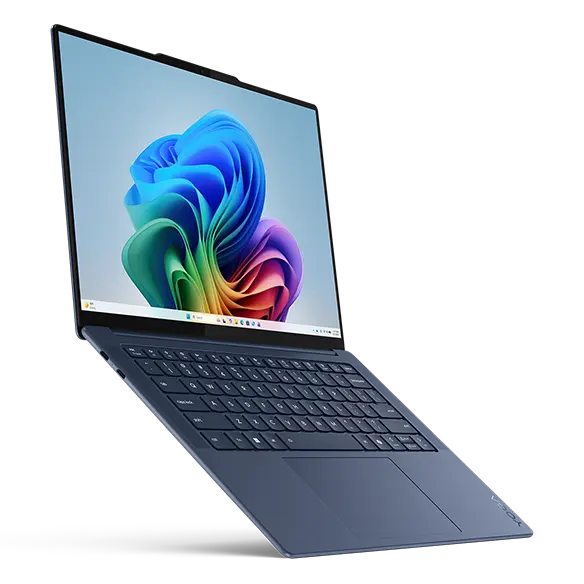
The Lenovo Yoga Slim 7x is the travel laptop I’d grab if outlets are hard to come by. Tom’s Hardware ran it for 19 hours and 25 minutes in testing, which beat the MacBook Air by nearly four hours. One reviewer said he’d started recommending it to Windows users the way people recommend the MacBook Air to Mac users, and that’s about right.
It starts at $1,049, though the config worth buying runs about $1,499 with the Snapdragon X2 Elite, 32GB of memory, 1TB of storage, and the 2.8K OLED panel. That’s cheaper than the OmniBook Ultra for similar hardware. If you’re picking one Windows laptop off this list and want the best value, this is my pick.
The 2.8K 120Hz OLED display hits 1,100 nits in HDR, which means you can work outside without squinting. The aluminum chassis feels solid, it’s tested to MIL-STD-810H durability standards, and it weighs under 2.8 pounds. It also stays quiet, even under load.
The ports are the frustrating part. You get USB-C only, so no USB-A, no headphone jack, and no SD card reader. Pack a hub, or accept some dongle life on the road.
Like the OmniBook, this runs Windows on ARM. Most mainstream apps run natively now, but check your specific software before buying if your work depends on something niche. For writing, browsing, and everyday creative work, you’ll never think about it.
6. Surface Pro 12 – Best 2-in-1 Tablet Laptop
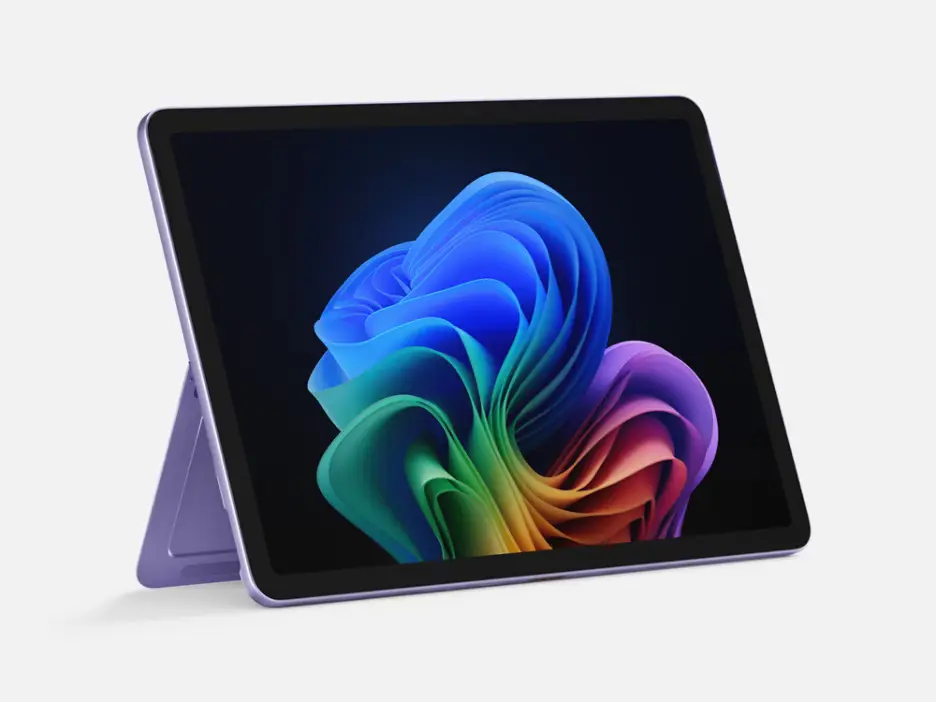
The Surface Pro 12 is the only travel laptop on this list that’s also a tablet, and that’s why it earns a spot. At 1.5 pounds and 7.8mm thick, it’s the thinnest Surface ever made, roughly the weight of an iPad Pro. I pull the keyboard off to read on flights, then snap it back on to answer emails at the gate.
The 12-inch touchscreen is sharp and responsive, and the Snapdragon chip gives the Surface Pro 12 all-day battery. The Surface Slim Pen docks magnetically to the back and charges there, which I appreciate when I’m marking up documents in a café. You’re running full Windows too, so you get real desktop apps and browser extensions rather than a locked-down app store.
Here’s what bugs me about it. Microsoft charges $150 extra for the keyboard, and nobody buys a Surface Pro without one, so the real starting price is nearer $1,000 than the $849 advertised. Engadget called that anti-consumer, and I’d agree.
Performance sits below the 13-inch model, so I wouldn’t buy the Surface Pro 12 for heavy video editing. It’s built for writers, marketers, and anyone whose remote work lives in documents, browsers, and video calls. If you also want a tablet, nothing else here comes close.
I’d buy the Surface Pro 12 if the detachable design solves a real problem for you. If it doesn’t, the Dell XPS 13 gives you more laptop for less money, and I’d point you there instead. Either way, don’t pay $849 expecting a complete machine.
Best Travel Laptops for Remote Work Compared
Six laptops, one table, so you can stop scrolling and just pick one. I’ve used tested battery figures here rather than the manufacturer claims, because those are almost always fantasy. Note the Surface Pro’s price: add $150 for the keyboard you’ll need.
| Laptop | Best For | Weight | Battery (tested) | Price From |
|---|---|---|---|---|
| MacBook Air M5 | Best overall | 2.7 lbs | 15 hrs | $1,299 |
| Dell XPS 13 | Best value | 2.2 lbs | 17 hrs | $699 |
| MacBook Pro 16-inch M5 | Best for creatives | 4.8 lbs | 21 hrs | $2,999 |
| HP OmniBook Ultra 14 | Best premium Windows | 2.8 lbs | 22 hrs | $1,899 |
| Lenovo Yoga Slim 7x | Best battery life | 2.8 lbs | 19 hrs | $1,049 |
| Surface Pro 12 | Best 2-in-1 | 1.5 lbs | All day | $849 + $150 keyboard |
FAQs about the Top Travel Laptops
Here are some popular questions I get from digital nomads during my travels around the world.
How much should I spend on a travel laptop?
I’ve gone cheap before, and it cost me more in the long run…crashes, slow speeds, and repairs on the road aren’t worth it. If you just write and email, you can get by with a budget-friendly ultrabook. But if you edit photos or video, expect to spend $1,000–$2,000 for something reliable. I see it as an investment in my business and sanity.
What size laptop is best for digital nomads?
For me, 13–14 inches is the sweet spot. It’s big enough for multitasking but small enough to fit in any backpack. I once traveled with a 16-inch laptop, and while the screen was gorgeous, lugging it through airports and onto buses got old fast. Unless you’re a video editor who really needs the extra screen real estate, lighter is better.
Do I need a powerful GPU for travel work?
It depends. When I’m just writing and managing my site, no. But when I’m editing 4K video or running Lightroom with hundreds of RAW files, absolutely yes. A dedicated GPU is essential if you’re doing creative work. Otherwise, you can stick to integrated graphics.
Is it safe to travel with an expensive laptop?
I’ve traveled with premium laptops for years, and while there’s always a risk, I minimize it with a padded case, VPN for online security, and by never leaving my bag unattended. I also back everything up to the cloud. Losing a laptop is painful, but losing data is worse.
Should I get a MacBook or a Windows laptop?
I’ve used both, and it really comes down to preference and workflow. MacBooks are amazing for creatives and feel bulletproof, but they’re pricey. Windows laptops give you way more options across price points and features. Personally, I’ve leaned Mac for editing and Windows for versatility.
Global Viewpoint is a personal blog. All content is for informational and entertainment purposes only and does not constitute professional financial, medical, or legal advice.